MadCap Flare is widely used by technical writers in the IT industry for creating and managing documentation. It is a powerful authoring and publishing tool that allows writers to create a variety of documentation types, such as user guides, knowledge bases, and API documentation.
Here’s how technical writers in IT use it:
1. Single-Sourcing and Content Reuse
Writers can create modular content (topics) and reuse them across multiple documents.
Conditional tagging helps generate different versions of a document from a single source.
2. Multi-Channel Publishing
Documents can be published in multiple formats, such as HTML5 (help sites), PDF, Word, EPUB, and more.
Helps IT teams provide documentation in different formats based on user needs.
3. Integration with Source Control and DevOps
Supports integration with Git, Azure DevOps, and other version control systems.
Facilitates collaboration with developers and IT teams in agile environments.
4. Topic-Based Authoring
Writers create modular, reusable topics instead of long, linear documents.
Makes it easier to maintain and update documentation.
5. Advanced Formatting and Customization
Uses CSS and skins to customize the look and feel of documentation.
Allows IT teams to brand documentation to match corporate styles.
6. Automated TOC, Indexing, and Search Optimization
Improves navigation with automatically generated tables of contents, indexes, and search functions.
Useful for IT support portals and self-service documentation.
7. Localization and Translation Support
Supports translation workflows for multilingual documentation.
Helps IT companies provide global support.
8. Collaboration with SMEs and Review Processes
Features like MadCap Central allow teams to collaborate, review, and manage documentation in a cloud-based environment.
SMEs (Subject Matter Experts) can review and comment on content easily.
9. API Documentation and Code Snippets
Supports integration with tools like Swagger for API documentation.
Writers can include code snippets with syntax highlighting for developer documentation.
MadCap Flare is particularly useful for IT companies that need to manage large-scale documentation projects efficiently while maintaining consistency across multiple outputs.
================================================================================
MadCap Flare’s workflow as a Content Management System (CMS) follows a structured approach that allows technical writers in IT to efficiently create, manage, and publish documentation. Here’s a typical workflow:
1. Planning & Setup
Before starting documentation, teams define:
✔️ Project Scope – What content needs to be created (e.g., user guides, API docs, knowledge base articles)?
✔️ Content Reuse Strategy – Identify topics that can be reused across documents.
✔️ Target Outputs – Determine output formats (PDF, HTML5, Word, etc.).
✔️ Team Collaboration Tools – Configure MadCap Central for cloud-based collaboration (optional).
2. Content Authoring (Topic-Based Authoring)
Flare uses a modular, topic-based approach, meaning:
✔️ Writers create individual topics instead of long, linear documents.
✔️ Topics are stored in an XML-based format for easy editing.
✔️ Content reuse is achieved using snippets (reusable text blocks) and variables (e.g., product names, version numbers).
💡 Example: A single “Installation Guide” topic can be reused across multiple user manuals.
3. Organizing & Structuring Content
Writers organize topics into:
✔️ TOC (Table of Contents) – Defines the navigation structure.
✔️ Indexing & Tagging – Improves searchability with metadata tags.
✔️ Glossary – Helps define technical terms for users.
✔️ Conditional Tags – Allows different versions of the same content (e.g., one manual for “Admins” and another for “End Users”).
💡 Example: A software product might need documentation for Windows, macOS, and Linux—Flare allows conditional tags to publish tailored content.
4. Review & Collaboration
✔️ SME Reviews: Subject Matter Experts can review content using MadCap Central (a cloud-based review system).
✔️ Track Changes & Comments: Writers can review changes and resolve comments.
✔️ Version Control: Teams can use Git, Perforce, or Flare’s built-in source control for managing multiple contributors.
💡 Example: A development team can review API documentation and suggest edits directly in MadCap Central.
5. Styling & Customization
✔️ CSS & Skins – Flare allows full customization of content appearance.
✔️ Master Pages & Templates – Writers create reusable page layouts.
✔️ Multimedia Support – Can embed images, videos, and interactive elements.
💡 Example: A tech company can customize online help portals to match their brand identity.
6. Publishing & Multi-Channel Output
MadCap Flare supports single-source publishing, meaning one project can generate multiple outputs:
✔️ HTML5 Help Center – Interactive online documentation.
✔️ PDF User Guides – Printable manuals.
✔️ Microsoft Word Docs – For internal reports or printable guides.
✔️ EPUB & Kindle – For eBook-style documentation.
💡 Example: A SaaS company can publish online help (HTML5) and PDF guides from the same content source.
7. Maintenance & Updates
✔️ Easy Updates – Modify a single topic and it updates across all outputs.
✔️ Version Control – Manage multiple documentation versions (e.g., v1.0, v2.0, v3.0).
✔️ Analytics & User Feedback – Measure how users interact with documentation (MadCap Insights).
💡 Example: If a new software release requires updates to 10+ guides, Flare allows quick, centralized updates.
Final Thoughts
MadCap Flare acts as a powerful CMS by providing:
✅ Modular, reusable content
✅ Collaboration tools for SMEs & Devs
✅ multi-channel publishing
✅ Efficient version control & maintenance
============================================================================
Detailed Breakdown of the MadCap Flare CMS Workflow
MadCap Flare acts as a powerful Content Management System (CMS) for technical writers in the IT industry, providing structured authoring, collaboration, and multi-channel publishing. Below is a detailed breakdown of each workflow step.
1. Planning & Setup
Before starting documentation, teams define:
✔️ Project Scope: What needs to be documented (e.g., user guides, API docs, troubleshooting manuals)?
✔️ Content Structure: Topic-based approach with reusable components.
✔️ Publishing Targets: PDF, HTML5 Help, Word, or multiple formats.
✔️ Collaboration Tools: Use MadCap Central (cloud-based) or integrate with Git, Perforce, or TFS for version control.
✔️ Customization Needs: Define styles, branding, and user experience requirements.
💡 Example: A software company launching a new cloud product plan to provide both an online help portal (HTML5) and installation guides (PDF).
2. Content Authoring (Topic-Based Authoring)
Flare follows a topic-based approach, where content is broken into small, reusable units.
✔️ Topics as Modules: Each section (e.g., “Installation,” “Troubleshooting”) is a separate file.
✔️ Snippets: Reusable content blocks (e.g., disclaimers, standard instructions).
✔️ Variables: Placeholders for dynamic text (e.g., product names, version numbers).
✔️ Conditional Text: Allows content variations for different audiences.
✔️ Built-in XML Editor: Authors work in a structured XML format for better content reuse and consistency.
💡 Example: The “Login Instructions” topic can be reused in Admin, User, and Developer guides without duplication.
3. Organizing & Structuring Content
MadCap Flare helps technical writers maintain content consistency and usability.
✔️ Table of Contents (TOC): Defines navigation hierarchy and document flow.
✔️ Indexing & Tagging: Improves searchability with metadata and keywords.
✔️ Glossary & Definitions: Automatically link terms to their definitions.
✔️ Content Categories: Organize documents based on user roles (Admin, End-User, Developer).
💡 Example: The same documentation set can serve IT admins and end-users, but Flare allows different versions with targeted content.
4. Review & Collaboration (SMEs & Dev Teams)
Technical writers collaborate with developers, product managers, and subject matter experts (SMEs).
✔️ MadCap Central (Cloud Review): SMEs can review, comment, and approve content online.
✔️ Track Changes & Comments: Writers can accept/reject edits.
✔️ Git & Perforce Integration: Developers can work on documentation alongside code repositories.
✔️ Workflow Automation: Assign writing tasks, track progress, and set deadlines.
💡 Example: A DevOps engineer can review API documentation via MadCap Central and suggest updates without installing Flare.
5. Styling & Customization
MadCap Flare allows advanced formatting to match branding and usability needs.
✔️ CSS-based Styling: Customize fonts, colors, and layouts.
✔️ Master Pages: Create reusable templates for consistent formatting.
✔️ Responsive Skins: Adaptive layouts for mobile and desktop viewing.
✔️ Multimedia Integration: Add videos, interactive elements, and callouts.
💡 Example: A SaaS company ensures that their online knowledge base matches their website branding using custom CSS.
6. Publishing & Multi-Channel Output
One of Flare’s biggest strengths is single-source publishing—one set of content, multiple formats.
✔️ HTML5 Help Center: Interactive online documentation with search, TOC, and breadcrumbs.
✔️ PDF & Word Documents: Printable manuals for compliance and offline use.
✔️ EPUB & Kindle: eBooks for mobile reading.
✔️ Knowledge Base Integration: Embed Flare content into platforms like Zendesk, Salesforce, and ServiceNow.
💡 Example: A cybersecurity company publishes an HTML5 help center for online users and PDF guides for enterprise clients—all from the same source.
7. Version Control & Maintenance
Flare helps teams manage documentation versions efficiently over time.
✔️ Version Branching: Create and maintain multiple versions of the same document (e.g., v1.0, v2.0, v3.0).
✔️ Source Control Integration: Works with Git, Perforce, and TFS.
✔️ Auto-Updates: Change a snippet once, and all documents update automatically.
✔️ Archived Versions: Maintain past documentation while working on new releases.
💡 Example: A software product releases v3.0, but clients still use v2.0—Flare allows both versions to coexist.
8. Analytics & User Feedback
✔️ MadCap Insights (Analytics Tool): Track how users interact with online documentation.
✔️ Search Query Analysis: Identify common search terms and improve content accordingly.
✔️ Feedback Mechanisms: Allow users to provide direct feedback on documentation.
💡 Example: If users frequently search for “reset password” but can’t find the right page, writers can adjust content accordingly.
Conclusion: Why MadCap Flare as a CMS?
MadCap Flare enables IT technical writers to:
✅ Create structured, reusable content
✅ Collaborate seamlessly with developers & SMEs
✅ Publish to multiple formats from a single source
✅ Maintain multiple document versions efficiently
✅ Track user engagement and improve documentation quality
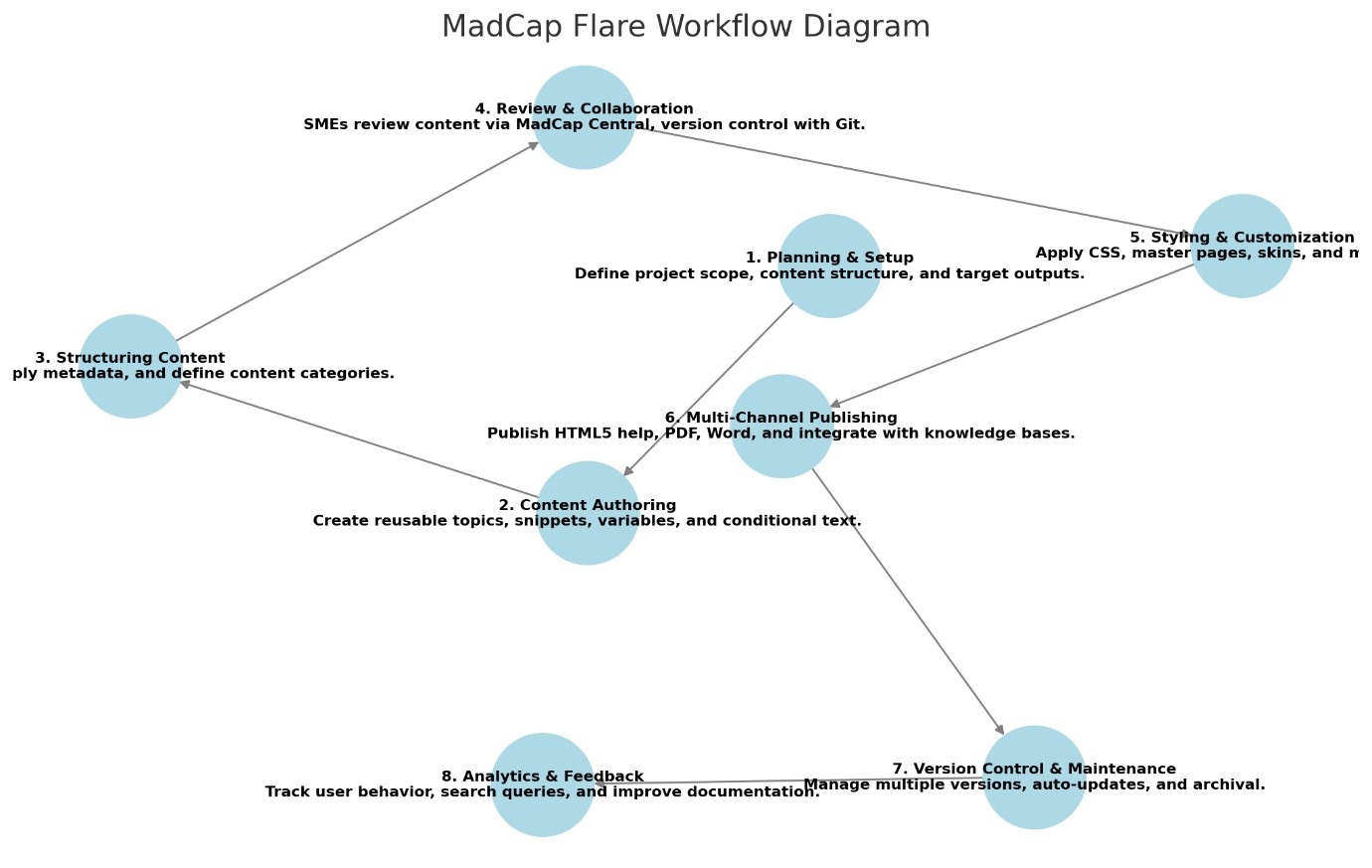
Here’s a MadCap Flare Workflow Diagram that outlines the key stages, along with examples for each step. I’ll generate a clear, structured diagram for you. Give me a moment.
Here’s a MadCap Flare Workflow Diagram showing the key steps from planning to analytics & feedback. Each step includes an example of how it’s applied in a real documentation project.
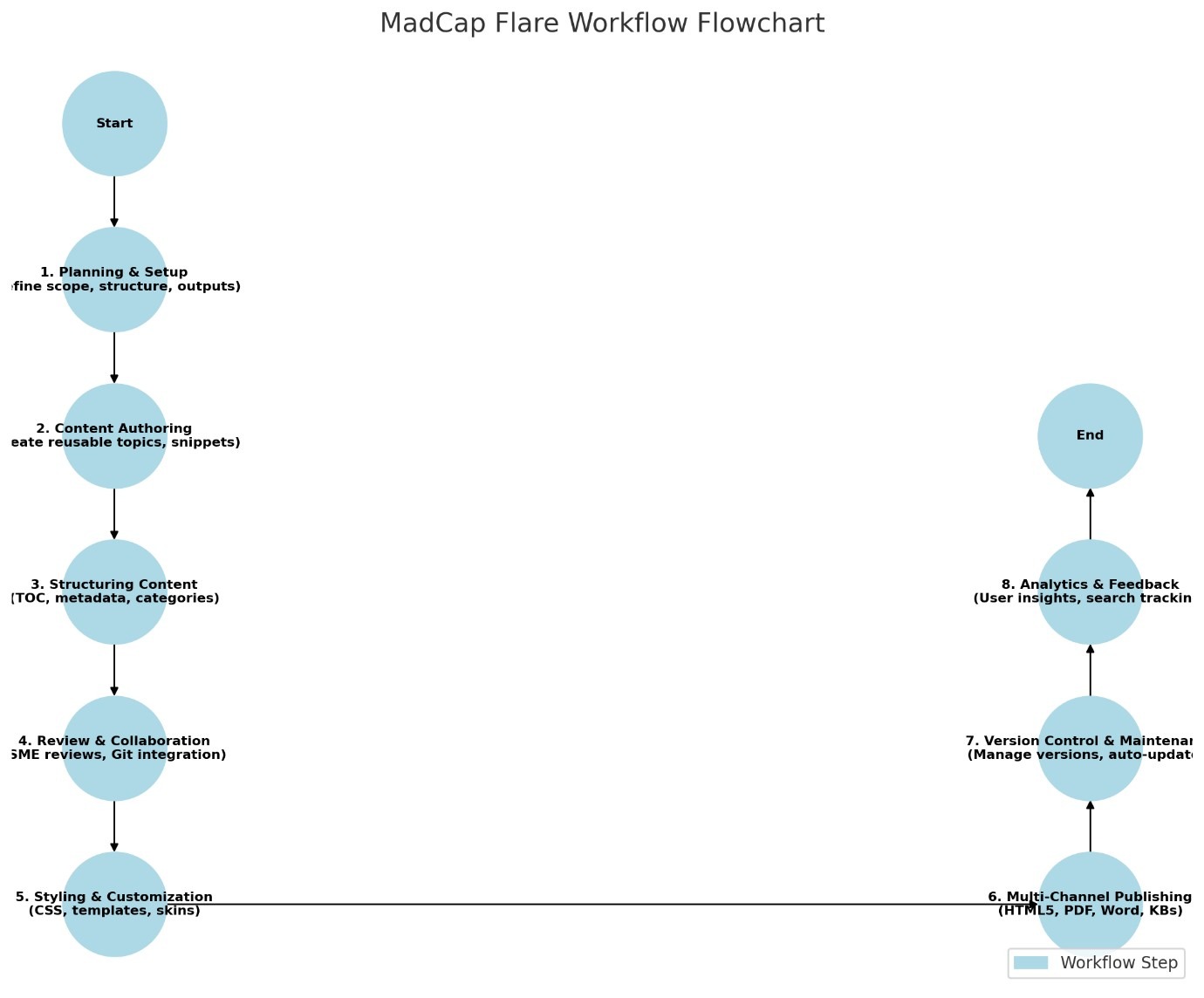
I’ll create a flowchart-style diagram for the MadCap Flare workflow, using a structured format with proper connectors and visual elements. Give me a moment.
PFA
Here’s the flowchart-style diagram for the MadCap Flare workflow, showing a structured step-by-step process from planning to analytics. Each stage is connected in a logical sequence.